TCP vs UDP: Differences and When to Use Each
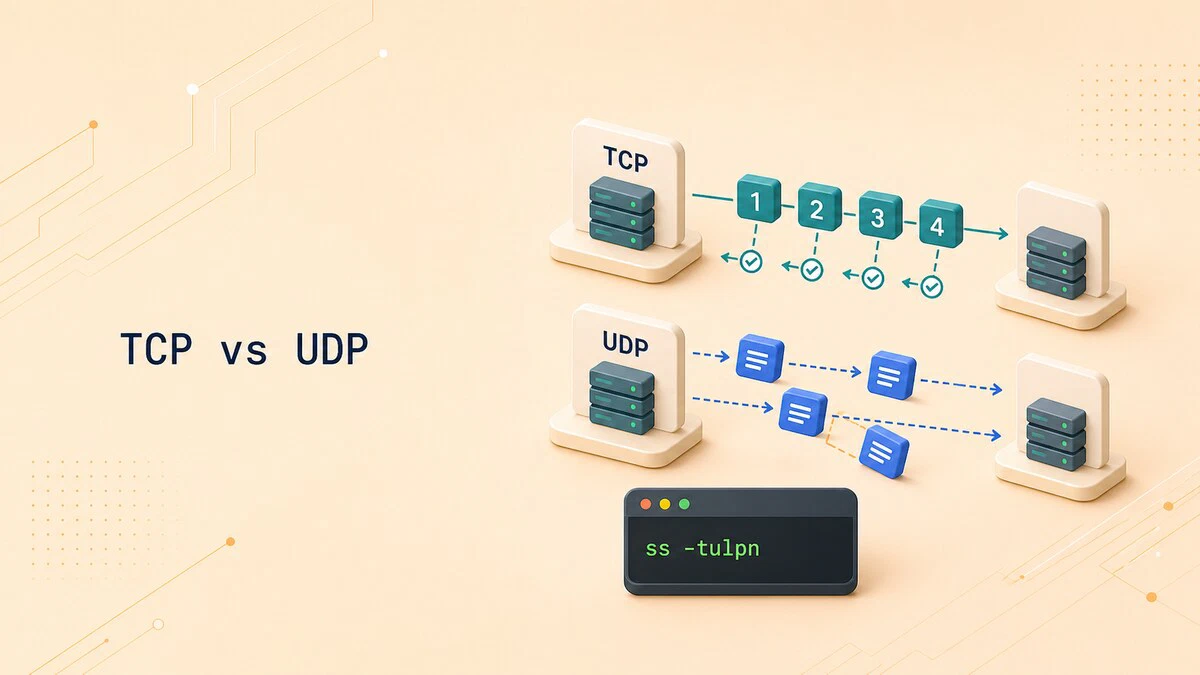
Almost every networked application on your machine uses TCP or UDP, either directly or through a protocol built on top of one of them. TCP tracks a connection and delivers an ordered byte stream, at the cost of extra round trips and bookkeeping. UDP sends independent datagrams without transport-level recovery, giving the application more control over timing and retransmission. This difference helps explain why file transfers recover missing data while a live call may skip a late packet and continue.
This guide explains how TCP and UDP differ, which services rely on each, and how to tell which protocol a port uses on a Linux system.
Two Transport Protocols
TCP and UDP sit at the transport layer, one level above IP. IP moves packets between hosts but makes no promise that they arrive, arrive once, or arrive in order. The transport protocol decides what to do about that.
TCP (Transmission Control Protocol) provides a reliable, ordered byte stream. UDP (User Datagram Protocol) sends independent datagrams with minimal transport-layer processing. If an application needs reliability over UDP, it must provide that behavior itself or use another protocol built on top of UDP.
How TCP Works
TCP is connection-oriented. Before application data normally flows, the two sides establish a connection with a three-way handshake: the client sends SYN, the server replies with SYN-ACK, and the client answers with ACK. This setup synchronizes sequence numbers and lets both endpoints track the connection.
Once connected, TCP provides several important behaviors:
- Reliable delivery. TCP detects lost or damaged segments and retransmits data while the connection remains usable. If recovery fails, the application receives a connection error instead of a successful delivery confirmation.
- Ordered delivery. Segments carry sequence numbers, so the receiver reassembles them in the order they were sent even if the network delivers them out of order.
- Flow and congestion control. TCP adjusts its sending rate to avoid overwhelming the receiver or the network.
- A continuous byte stream. Applications read bytes in order, but TCP does not preserve the boundaries between individual writes. Applications must define their own message format.
These mechanisms cost something: the handshake adds round trips before data moves, and the acknowledgments and retransmissions add overhead and latency. For a file download or an SSH session, that cost is worth it, because missing data would corrupt the result.
How UDP Works
UDP is connectionless. There is no handshake; a sender simply puts data in a datagram and sends it. The receiver may get it, may get it out of order, or may not get it at all, and UDP itself does nothing to correct any of that.
Unlike TCP’s byte stream, UDP preserves datagram boundaries. One datagram sent by the application is delivered as one datagram if it arrives. The UDP header also has a checksum field for detecting corruption, but UDP does not acknowledge packets or retransmit lost data.
UDP has several practical characteristics:
- No connection setup. An application can send the first datagram without completing a transport handshake.
- Low protocol overhead. The UDP header is 8 bytes, compared with a TCP header of at least 20 bytes.
- No transport-level ordering. A delayed or lost datagram does not make UDP wait for it before delivering another datagram.
- Application-controlled recovery. The application decides whether to ignore loss, retry a request, or add acknowledgments and retransmissions.
UDP is not automatically faster in every application. Its smaller header and lack of connection setup can reduce latency, but real performance depends on the application protocol, network conditions, packet size, and any reliability mechanisms added above UDP.
Key Differences
The table below summarizes the contrast:
| Property | TCP | UDP |
|---|---|---|
| Connection | Connection-oriented, handshake first | Connectionless, no setup |
| Data model | Continuous byte stream | Independent datagrams |
| Reliability | Detects loss and retransmits | No delivery or retransmission mechanism |
| Ordering | Delivers bytes in order | Datagrams may arrive out of order |
| Flow and congestion control | Built into TCP | Must be handled by the application protocol |
| Header size | 20 bytes or more | 8 bytes |
| Typical use | Web over HTTP/1.1 or HTTP/2, email, SSH, file transfer | DNS queries, DHCP, NTP, voice, games, and QUIC |
Which Protocol Services Use
The protocol a service uses depends on whether it needs an ordered byte stream, independent messages, low setup latency, or application-specific control over recovery.
Common TCP Uses
- HTTP/1.1 and HTTP/2 use TCP, while HTTP/3 uses QUIC over UDP.
- SSH for remote login.
- SMTP, IMAP, and POP3 for email.
- FTP for file transfer.
Common UDP Uses
- DHCP for handing out addresses at boot, before a connection could even be set up.
- NTP for time synchronization.
- Voice, video conferencing, and many online games often use UDP when late data is less useful than current data.
Some application protocols can use both transports. DNS commonly sends queries over UDP, but DNS implementations must also support TCP. TCP is used for operations such as zone transfers and when a response is truncated over UDP. EDNS allows DNS endpoints to advertise support for larger UDP messages, which reduces but does not eliminate TCP fallback.
QUIC is another important case. It runs over UDP but implements reliable streams, congestion control, encryption, and connection management itself. HTTP/3 uses QUIC, so modern web traffic is not limited to TCP.
Port numbers are assigned separately for TCP and UDP. A service can therefore use the same numeric port with both transports, as DNS does with port 53.
See Which Protocol a Port Uses
On Linux, use the ss command
to list TCP and UDP sockets together:
sudo ss -tulpnThe flags select TCP (-t) and UDP (-u) sockets, listening sockets (-l), process information (-p), and numeric addresses and ports (-n). The output lists one socket per line:
Netid State  Recv-Q Send-Q Local Address:Port  Peer Address:Port Process
udp   UNCONN 0      0      127.0.0.53%lo:53    0.0.0.0:*         users:(("systemd-resolve",pid=712,fd=12))
udp   UNCONN 0      0      0.0.0.0:68          0.0.0.0:*         users:(("dhclient",pid=920,fd=6))
tcp   LISTEN 0      4096   127.0.0.53%lo:53    0.0.0.0:*         users:(("systemd-resolve",pid=712,fd=13))
tcp   LISTEN 0      128    0.0.0.0:22          0.0.0.0:*         users:(("sshd",pid=1043,fd=3))
tcp   LISTEN 0      511    0.0.0.0:80          0.0.0.0:*         users:(("nginx",pid=1410,fd=6))
The Netid column names the transport. TCP listeners appear with the LISTEN state, while an unconnected UDP socket commonly appears as UNCONN. Notice that the local resolver holds port 53 on both udp and tcp, which matches the DNS behavior described earlier: queries usually travel over UDP, but the service still listens on TCP for larger responses and zone transfers. The DHCP client sits on UDP port 68, while SSH (port 22) and the web server (port 80) use TCP.
To check the registered transport mappings for DNS, search /etc/services:
grep -E '^[[:space:]]*domain[[:space:]]' /etc/servicesThe file shows conventional service registrations, not which processes are currently running. Use ss for the live socket state. The guide on checking listening ports
covers additional filters and tools.
Conclusion
TCP provides a reliable, ordered byte stream, while UDP sends independent datagrams and leaves recovery decisions to the application. Choose based on the behavior the application needs, then use ss -tulpn to verify which transport its Linux sockets use.
Tags
Linuxize Weekly Newsletter
A quick weekly roundup of new tutorials, news, and tips.
About the authors

Dejan Panovski
Dejan Panovski is the founder of Linuxize, an RHCSA-certified Linux system administrator and DevOps engineer based in Skopje, Macedonia. Author of 1000+ Linux tutorials with 20+ years of experience turning complex Linux tasks into clear, reliable guides.
View author page