Bash source Command: Load Scripts and Variables
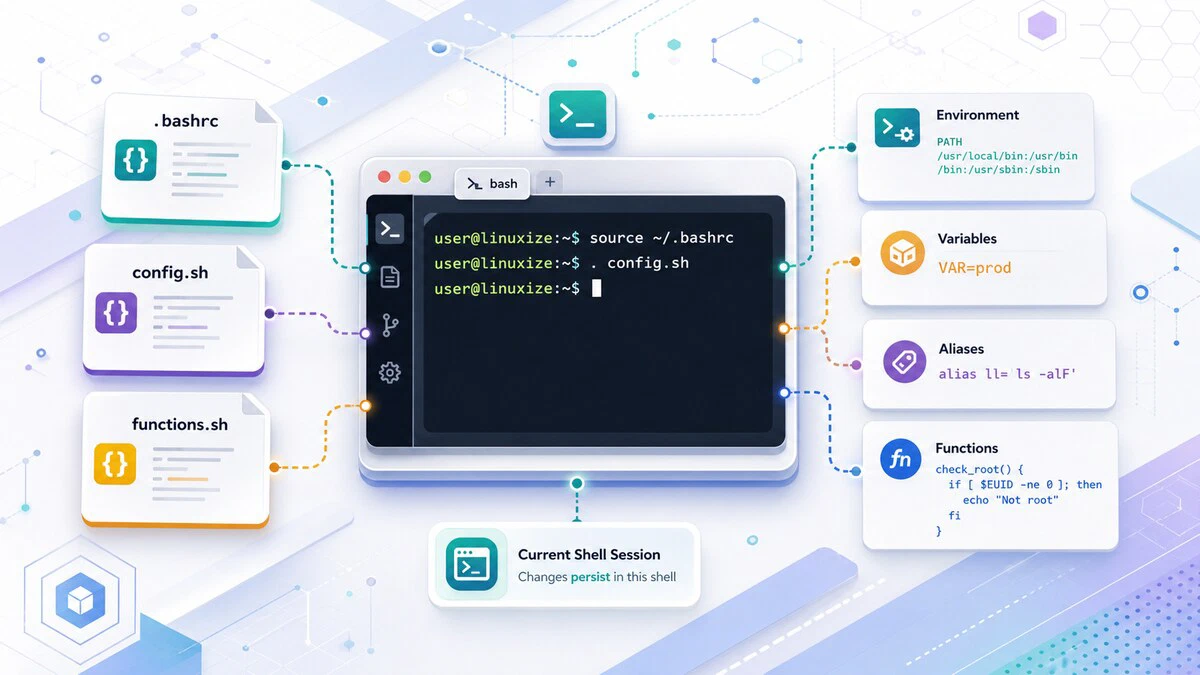
The most common reason to use source is reloading your shell configuration without opening a new terminal: after editing ~/.bashrc, run source ~/.bashrc and the changes take effect immediately in your current session.
source reads and executes a file in the current shell environment. Any variables and functions it defines remain available after it exits. This is what sets it apart from running a script with bash script.sh, which uses a subshell and discards everything on exit.
Syntax
The syntax for the source command is:
source FILENAME [ARGUMENTS]
. FILENAME [ARGUMENTS]sourceand.(a period) are the same command. The dot form is POSIX-compliant and works in any POSIX shell.- If
FILENAMEdoes not contain a slash, the command searches for the file in the directories listed in the$PATHenvironment variable . If the file is not found in$PATH, it looks in the current directory. - If
ARGUMENTSare provided, they become the positional parameters of the sourced file. - The exit code
is the status of the last command executed in the sourced file. If Bash cannot read the file,
sourcereturns a failure status.
source vs. Running a Script Directly
The key difference between source script.sh and bash script.sh is which shell environment the commands run in:
bash script.sh: spawns a new subshell, runs the script there, and discards all variables and functions when the subshell exits. The parent shell is unchanged.source script.sh: runs the script in the current shell. Any variables, functions, or environment changes defined in the script remain available after it finishes.
This distinction is the core reason source exists. If you want a script to set variables that your current session can use, you must source it.
Reload Shell Configuration
The most common use of source is reloading the shell configuration file after making changes, without needing to open a new terminal:
source ~/.bashrcAfter editing ~/.bashrc to add aliases
, functions, or environment variables, run the command above to apply the changes immediately. Without source, you would need to log out and log back in.
For login shells, reload the profile instead:
source ~/.bash_profileSee .bashrc vs .bash_profile for an explanation of when each file is used.
Configuration files often source other files, and sourcing a file that is missing prints an error every time the shell starts. Guard the call with a test so the shell starts cleanly whether or not the file is there:
[ -f ~/.bash_aliases ] && source ~/.bash_aliasesUbuntu’s default ~/.bashrc uses the same guard as an if block with . ~/.bash_aliases, which is why putting your aliases in ~/.bash_aliases works without editing ~/.bashrc at all.
Sourcing Functions
If multiple scripts use the same functions , extract them into a shared file and source it where needed. This avoids duplicating code across scripts.
In the following example, we create a file that contains a function to check whether the script is running as root:
check_root () {
  if [[ $EUID -ne 0 ]]; then
    echo "This script must be run as root"
    exit 1
  fi
}
In each script that requires root, source the file and call the function:
#!/usr/bin/env bash

source ./functions.sh
check_root

echo "I am root"
If the script runs as a non-root user, it prints the message and exits. The advantage of this approach is that your scripts stay smaller and more readable, the shared function file is maintained in one place, and any update to it is automatically picked up by all scripts that source it.
Read Variables from a File
source can also read variables from a configuration file. The variables must use Bash assignment syntax: VARIABLE=VALUE.
Create a configuration file:
VAR1="foo"
VAR2="bar"
In your script, source the file to load the variables:
#!/usr/bin/env bash

source ./config.sh

echo "VAR1 is $VAR1"
echo "VAR2 is $VAR2"
Running the script produces:
VAR1 is foo
VAR2 is bar
This pattern is useful for keeping configuration separate from logic, making scripts easier to maintain and reuse across different environments.
There is a catch. Variables loaded this way are shell variables, not environment variables, so any program the script starts does not inherit them. Add a line that runs a child shell and the difference shows up right away:
#!/usr/bin/env bash

source ./config.sh

echo "VAR1 is $VAR1"
bash -c 'echo "child sees: $VAR1"'
The child shell prints an empty value:
VAR1 is foo
child sees:
To pass the values down, mark them for export while the file is being read. set -a (also written set -o allexport) exports every variable assigned after it, and set +a turns that behavior back off:
#!/usr/bin/env bash

set -a
source ./config.sh
set +a

echo "VAR1 is $VAR1"
bash -c 'echo "child sees: $VAR1"'
Both lines now report the value:
VAR1 is foo
child sees: foo
This is the usual way to load a .env file before starting an application, because the application reads its settings from the environment rather than from your shell. See export
for the other ways to mark a variable for export.
source executes the file; it does not simply parse it. A line such as VAR=$(whoami) in a config file runs whoami through command substitution while the file is being sourced, and a file you did not write can run anything else the same way. Only source files you control, and keep .env files out of version control by listing them in .gitignore.Using BASH_SOURCE
Inside a sourced file, $0 still holds the name of the shell or script that did the sourcing, not the file being read. That makes $0 unreliable for working out where a sourced file lives. Bash keeps the answer in the BASH_SOURCE array instead, where ${BASH_SOURCE[0]} is the path of the file currently being executed, whether it was sourced or run directly.
Create a file that prints both values:
echo "BASH_SOURCE: ${BASH_SOURCE[0]}"
echo "0:           $0"
Then source it from a second script:
#!/usr/bin/env bash

source ./whereami.sh
Run the caller:
bash ./caller.shThe two values disagree:
BASH_SOURCE: ./whereami.sh
0:           ./caller.sh
BASH_SOURCE[0] points at the sourced file, while $0 names the caller. Run bash ./whereami.sh instead and both report ./whereami.sh, because in that case the file being read and the script being run are the same.
This matters when a sourced helper needs to find files next to itself. Resolve its own directory first, and the helper keeps working no matter which directory the caller was started from:
SCRIPT_DIR=$(cd "$(dirname "${BASH_SOURCE[0]}")" && pwd)
source "$SCRIPT_DIR/functions.sh"
Quick Reference
For a printable quick reference, see the Bash cheatsheet .
| Task | Command |
|---|---|
| Source a file | source filename.sh |
| Source using dot shorthand | . filename.sh |
Reload .bashrc | source ~/.bashrc |
Reload .bash_profile | source ~/.bash_profile |
| Source with arguments | source filename.sh arg1 arg2 |
| Source only if the file exists | [ -f ./file.sh ] && source ./file.sh |
| Source and export every variable | set -a; source ./.env; set +a |
| Path of the sourced file | ${BASH_SOURCE[0]} |
Troubleshooting
No such file or directory
bash: filename.sh: No such file or directoryBash could not find the file. When the name contains no slash, Bash searches $PATH first and then the current directory, so a file sitting anywhere else is missed. Use an explicit path such as source ./filename.sh, and confirm the file is there with ls -l.
source: not found
./script.sh: 1: source: not foundThe script is running under /bin/sh, which is dash on Debian and Ubuntu, and dash has no source builtin. Replace source with the dot form, which every POSIX shell understands:
. ./filename.shVariables are not loaded after sourcing
Check the sourced file for valid Bash assignments (VAR=value with no spaces around =) and syntax errors.
Script exits right after source file.sh
The sourced file may contain exit, which terminates the current shell or script. Use return in sourced helper files. Also remember that sourced files run in the current shell, so they inherit options such as set -euo pipefail. See Bash strict mode
for more on that behavior.
FAQ
What is the difference between source and . (dot)?
They are identical. . is the POSIX standard form and works in any POSIX-compliant shell. source is a Bash built-in that does the same thing. Use . in scripts intended to run in /bin/sh, and source in Bash-specific scripts for readability.
Why do I need source to reload .bashrc?
Because running bash ~/.bashrc would execute it in a subshell. Any variables or aliases defined in it would be discarded when that subshell exits. Using source ~/.bashrc runs it in your current session, so the changes take effect immediately.
Does a sourced file need to be executable or have a shebang?
No. source reads the file with the shell you are already in, so the execute bit is never checked and a #!/bin/bash line on the first line is ignored. A file with 644 permissions and no shebang sources without any problem. The execute bit only matters when you run a script as ./script.sh.
Can I pass arguments to a sourced file?
Yes. Any arguments after the filename become positional parameters ($1, $2, etc.) inside the sourced file: source script.sh arg1 arg2.
What happens if the file does not exist?source returns exit code 1 and prints an error. In a script, you can handle this with: source file.sh || echo "file not found".
What is the difference between source and import in other languages?source is similar in concept; it loads and executes another file. The key difference is that source is not a module system; it simply runs the file inline in the current shell, with no namespacing or isolation.
Conclusion
The source command runs a file in the current shell environment, making its variables and functions available to the calling session or script. Use it to reload shell configuration files, share functions across scripts, and load variables from configuration files.
Tags
Linuxize Weekly Newsletter
A quick weekly roundup of new tutorials, news, and tips.
About the authors

Dejan Panovski
Dejan Panovski is the founder of Linuxize, an RHCSA-certified Linux system administrator and DevOps engineer based in Skopje, Macedonia. Author of 1000+ Linux tutorials with 20+ years of experience turning complex Linux tasks into clear, reliable guides.
View author page